1 / 5 · A working workspace

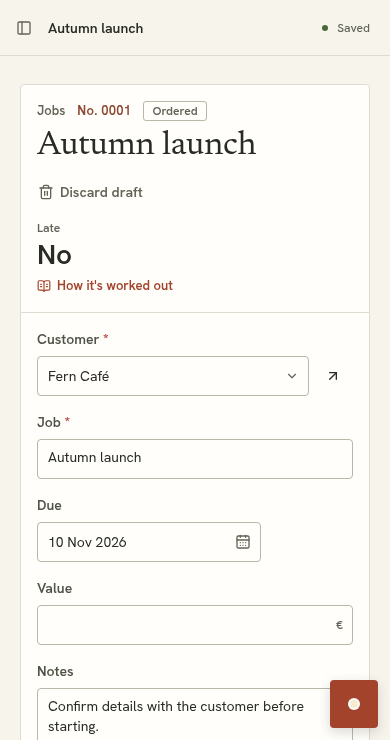
Morgan Studio keeps customer-linked jobs in ordinary working screens. Fern Café’s Autumn launch is due on 10 November. These are fictional records in a configured example, not the tools installed by plain signup.
Suppled works with your lists, records and rules. An industry starter can give you a head start; the workspace can grow beyond it.
14 days free. No card needed.
A small studio might track customers and project jobs. A service business might keep customer-linked jobs and visit dates. These are illustrative configurations, not available starter kits. Plain signup begins with business details and customers; further tools follow a reviewed proposal.
14 days free. No card needed.
See pricing and trial detailsDemo preview · a storyboard you control. No live AI or automatic playback.
Morgan Studio keeps customer-linked jobs in ordinary working screens. Fern Café’s Autumn launch is due on 10 November. These are fictional records in a configured example, not the tools installed by plain signup.

The example request is: Add a priority field to Jobs, with Normal and Urgent options. This is a prepared demonstration; no live AI runs here.

Review the proposed Priority field. Existing records stay in place. You can discard the proposal or try it before accepting.

The proposal preview shows the changed tool before acceptance. Accepting makes it part of the workspace. The editable example on this site simplifies that sequence.

Priority is now available on the same jobs. Open Autumn launch and change its priority using the record editor. In the product, accepted tools and saved records persist. Changes in the website’s editable example reset on reload.
A working workspace. Morgan Studio keeps customer-linked jobs in ordinary working screens. Fern Café’s Autumn launch is due on 10 November. These are fictional records in a configured example, not the tools installed by plain signup.
Ask for a change. The example request is: Add a priority field to Jobs, with Normal and Urgent options. This is a prepared demonstration; no live AI runs here.
Inspect the proposal. Review the proposed Priority field. Existing records stay in place. You can discard the proposal or try it before accepting.
Try it, then accept. The proposal preview shows the changed tool before acceptance. Accepting makes it part of the workspace. The editable example on this site simplifies that sequence.
Keep working. Priority is now available on the same jobs. Open Autumn launch and change its priority using the record editor. In the product, accepted tools and saved records persist. Changes in the website’s editable example reset on reload.