1 / 5 · A working workspace

Morgan Studio keeps customer-linked jobs in ordinary working screens. Fern Café’s Autumn launch is due on 10 November. These are fictional records in a configured example, not the tools installed by plain signup.
One place for contact details, with the same customer referenced by the quotes and jobs you configure.
14 days free. No card needed.
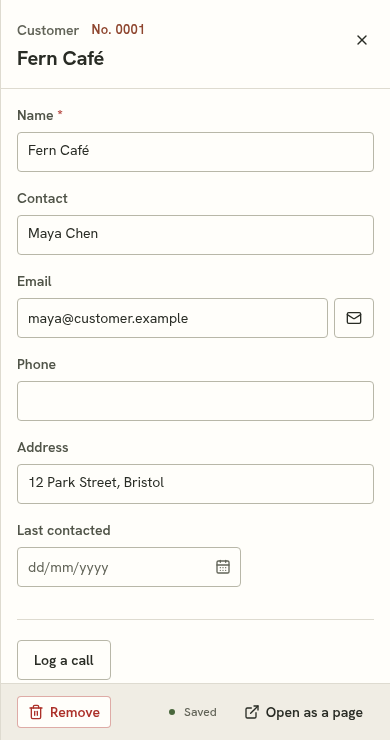
Customers are there from plain signup. Keep names, contacts, email addresses, phone numbers and addresses, then add the fields your business needs.
Here, Fern Café is the customer on both a quote and the Autumn launch job. Each has its own screen, referencing the same customer record.
Follow the quote example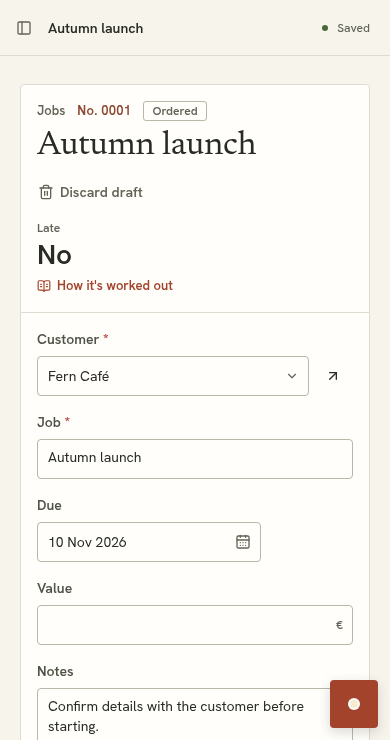
The verified example adds Last contacted and a Log a call button. Review and accept the proposal; pressing the button then records today’s date on that customer.
Ask for a next-contact date or follow-up list when your work needs one. Each is a further configuration to review.

Plain signup includes business details and customer records: name, contact, email, phone and address. Further fields and connected tools are configured through proposals.
In this configured example, the button sets Last contacted to today. It does not record phone calls or sync an inbox. Ask for further structured follow-up fields when you need them.
Yes. Import a spreadsheet into the customer list and review how its columns map to fields.
This example demonstrates customer records, a requested contact-date action and linked work. Replies to the emails you send from Suppled come back to the customer's record, and you can Bcc or forward other customer emails to your business's address. Sales forecasting, inbox sync and other conventional CRM features are not promised.
14 days free. No card needed.
See pricing and trial detailsDemo preview · a storyboard you control. No live AI or automatic playback.
Morgan Studio keeps customer-linked jobs in ordinary working screens. Fern Café’s Autumn launch is due on 10 November. These are fictional records in a configured example, not the tools installed by plain signup.

The example request is: Add a priority field to Jobs, with Normal and Urgent options. This is a prepared demonstration; no live AI runs here.

Review the proposed Priority field. Existing records stay in place. You can discard the proposal or try it before accepting.

The proposal preview shows the changed tool before acceptance. Accepting makes it part of the workspace. The editable example on this site simplifies that sequence.

Priority is now available on the same jobs. Open Autumn launch and change its priority using the record editor. In the product, accepted tools and saved records persist. Changes in the website’s editable example reset on reload.
A working workspace. Morgan Studio keeps customer-linked jobs in ordinary working screens. Fern Café’s Autumn launch is due on 10 November. These are fictional records in a configured example, not the tools installed by plain signup.
Ask for a change. The example request is: Add a priority field to Jobs, with Normal and Urgent options. This is a prepared demonstration; no live AI runs here.
Inspect the proposal. Review the proposed Priority field. Existing records stay in place. You can discard the proposal or try it before accepting.
Try it, then accept. The proposal preview shows the changed tool before acceptance. Accepting makes it part of the workspace. The editable example on this site simplifies that sequence.
Keep working. Priority is now available on the same jobs. Open Autumn launch and change its priority using the record editor. In the product, accepted tools and saved records persist. Changes in the website’s editable example reset on reload.