1 / 5 · A working workspace

Morgan Studio keeps customer-linked jobs in ordinary working screens. Fern Café’s Autumn launch is due on 10 November. These are fictional records in a configured example, not the tools installed by plain signup.
Keep the customer, the work and the figures together. Configure quoting around the way you price, then check the document before it goes out.
14 days free. No card needed.
Quoting is configured during setup after plain signup; it isn’t preinstalled.
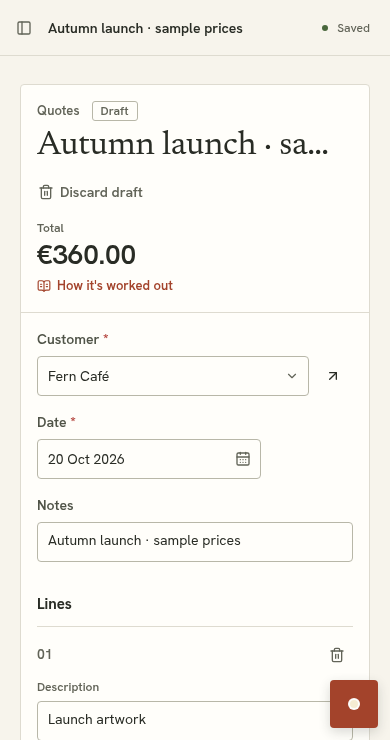
Change quantity or unit price. The formula works out the total.
The configured example uses line amounts, tax and a Quote PDF. Check the actual draft alongside these sample calculations.
Open the example draft PDFQuantity × unit price, rounded per line, plus VAT. Confirm your own prices before quoting. Changes reset on reload; no AI runs and nothing is sent.
Select Fern Café from the customer records.
Add descriptions, quantities and confirmed unit prices.
Review the totals and PDF, then review sending.
Its figures stay preserved when prices change later.
Ask for the change, inspect the proposed field and calculation, and compare the affected draft before accepting. An existing €300 net quote with a 10% discount becomes €270 net and €324 including 20% VAT.
Verified configured example. The new discount starts at zero. Discounts are an extension, not included in the simple-quoting example by default.

Fern Café is also referenced by the Autumn launch job. Additional lists, actions and links can be configured through reviewed proposals; accepting a quote does not automatically create a job in this example.
Explore customer managementAsk to configure supported calculations using your prices and data. Review the formulas and draft comparison, and confirm AI-read or suggested money inputs before use.
Import spreadsheet data into configured lists. Review the mapping and confirm prices before quoting.
The configured simple-quoting example has a Quote PDF using the business details, customer and line items. Check the draft before sending.
Issued quotes preserve their figures. Changing a price or rule does not rewrite them. Where revision is configured, revise into a new draft.
Plain signup starts with business details and customers. Discuss quoting during setup and review the proposed tool before accepting. Sign shops can instead choose the existing sign-shop starter.
14 days free. No card needed.
See pricing and trial detailsDemo preview · a storyboard you control. No live AI or automatic playback.
Morgan Studio keeps customer-linked jobs in ordinary working screens. Fern Café’s Autumn launch is due on 10 November. These are fictional records in a configured example, not the tools installed by plain signup.

The example request is: Add a priority field to Jobs, with Normal and Urgent options. This is a prepared demonstration; no live AI runs here.

Review the proposed Priority field. Existing records stay in place. You can discard the proposal or try it before accepting.

The proposal preview shows the changed tool before acceptance. Accepting makes it part of the workspace. The editable example on this site simplifies that sequence.

Priority is now available on the same jobs. Open Autumn launch and change its priority using the record editor. In the product, accepted tools and saved records persist. Changes in the website’s editable example reset on reload.
A working workspace. Morgan Studio keeps customer-linked jobs in ordinary working screens. Fern Café’s Autumn launch is due on 10 November. These are fictional records in a configured example, not the tools installed by plain signup.
Ask for a change. The example request is: Add a priority field to Jobs, with Normal and Urgent options. This is a prepared demonstration; no live AI runs here.
Inspect the proposal. Review the proposed Priority field. Existing records stay in place. You can discard the proposal or try it before accepting.
Try it, then accept. The proposal preview shows the changed tool before acceptance. Accepting makes it part of the workspace. The editable example on this site simplifies that sequence.
Keep working. Priority is now available on the same jobs. Open Autumn launch and change its priority using the record editor. In the product, accepted tools and saved records persist. Changes in the website’s editable example reset on reload.